
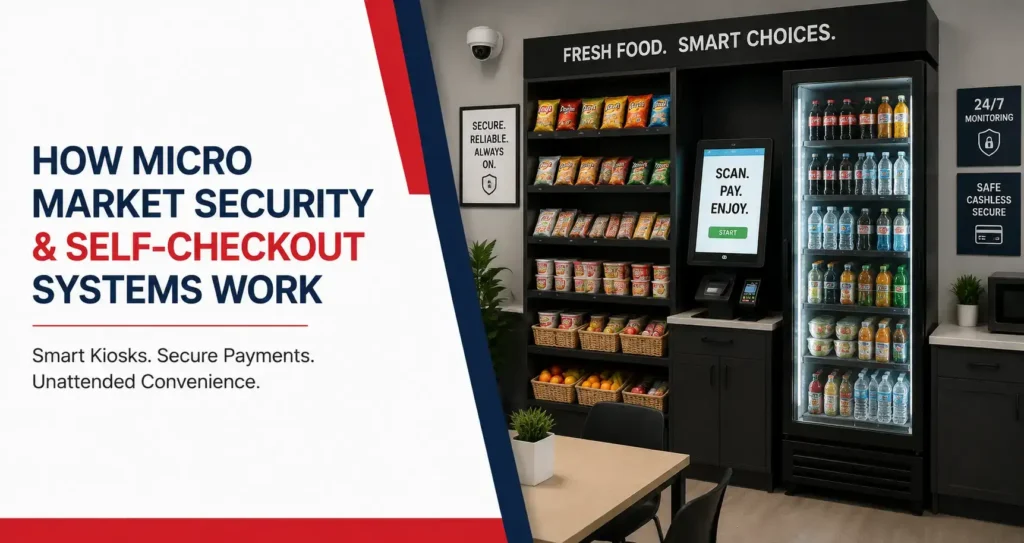
A workplace micro market allows employees to browse food and beverages without waiting for a cashier, but that convenience depends on several technologies working together. The self-checkout kiosk handles purchases, while payment processing, transaction records, inventory data, and security measures help the market operate as an unattended retail environment.
For employers, understanding how a micro market kiosk works can make the entire service easier to evaluate. The system is not simply a tablet placed beside a cooler. A modern setup connects checkout technology with product identification, payment options, inventory management, and practical security measures so employees can shop independently throughout the workday. Businesses looking at the complete micro market model can also review our micro market vending guide to understand how products, technology, setup, and ongoing service work together.
What Is a Micro Market Kiosk?
A micro market kiosk is the self-checkout point employees use to complete purchases after selecting products from shelves or refrigerated cases. Instead of inserting money into individual vending machines, employees can bring several items to one checkout area, scan them, review the purchase, and pay through the supported payment methods.
The kiosk is one part of a larger micro market system. Products, payment processing, transaction data, inventory tools, refrigeration, and security all work together to support an unattended shopping experience. The exact hardware and software can vary depending on the market provider and equipment platform.
How the Checkout Process Works
An employee begins by selecting food, snacks, or beverages from the market. At checkout, each product is identified through the kiosk system, commonly by scanning its barcode or using another supported product-selection method.
The employee can review the selected items before completing payment. Once the transaction is approved, the purchase is recorded by the system. This creates a more familiar retail experience than purchasing each item separately from an enclosed vending machine.
Why One Checkout Point Matters
A centralized checkout area allows employees to purchase several products together. Someone buying a sandwich, beverage, and snack can complete one transaction instead of interacting with several different machines.
This can be particularly useful during meal periods when employees want a complete lunch rather than a single snack. The kiosk also gives the micro market a more open layout because products do not have to be stored inside individual vending mechanisms.
Kiosk Placement Affects Usability
The checkout station should be easy to see after employees finish browsing. It should also have enough surrounding space for someone to scan products without blocking coolers, shelves, entrances, or other employees. Kiosk placement is only one part of successful market planning. Employers should also consider shelving, refrigeration, employee movement, and available space when reviewing micro market design and space requirements.
Good placement becomes especially important in warehouses and multi-shift facilities where several employees may use the market during the same scheduled break. Facilities operating across multiple shifts can learn more about these workplace requirements in our guide on warehouse micro markets, including traffic patterns, access needs, and service considerations.
Businesses exploring this format can review Best Vending’s micro market services to see how self-checkout fits into the broader workplace market setup.
How Does a Micro Market POS System Work?
A micro market POS system manages the transaction side of the market. It connects product information with checkout activity so the system can recognize items, calculate the purchase, process payment, and create a record of what was sold. Unlike a traditional retail register, the employee usually operates the checkout without a cashier present.
The POS system can also support the service provider by creating useful sales information. When transactions are recorded consistently, the provider can see which categories are performing well and use that information when planning product changes and future restocking.
Product Identification
Most products need to be registered within the market system before they can be purchased. The checkout platform associates each item with product information such as its name and selling price.
When employees scan an item, the system recognizes the product and adds it to the transaction. Accurate product setup is important because the checkout experience depends on the system identifying items correctly.
Transaction Processing
After all products are entered, the system calculates the total and prompts the employee to select an available payment method. Once payment is authorized, the purchase is completed and recorded.
This transaction record can support later sales analysis, product planning, and inventory decisions. It also creates accountability within an unattended shopping environment because purchases are captured digitally rather than relying entirely on manual tracking.
Sales Reporting
Sales data can reveal popular products, peak purchasing periods, and categories that may need additional capacity.
For example, a workplace may discover that refrigerated meals sell heavily around noon while beverages move consistently across the full day. That information can help the service provider adjust inventory around real use instead of relying only on assumptions.
What Payment Methods Can Micro Market Kiosks Accept?
Cashless purchasing is a central part of many modern micro markets because it allows employees to complete transactions without a staffed register. Depending on the specific checkout platform, a micro market payment system may support cards, mobile wallets, contactless payments, stored market accounts, or other digital payment options.
The available payment methods should be clearly explained to employees when the market launches. A checkout system works best when users can understand the process quickly, especially in facilities where breaks are short, and employees do not want to spend extra time figuring out how to pay.
Credit and Debit Cards
Card payments are familiar to most employees and can make the checkout process straightforward. Users scan their products, review the total, and then complete payment through the card reader connected to the kiosk.
Because payment processing depends on connectivity, the checkout equipment should be installed where the required network or cellular connection is reliable.
Contactless and Mobile Payments
Some systems may support tap-to-pay cards and mobile wallets. These options can make checkout faster for employees who already use contactless payments in stores and restaurants.
The exact methods available depend on the kiosk and payment processor used at the location, so employers should confirm supported options before the market is installed.
Market Accounts or Stored Balances
Certain micro market platforms may allow employees to create an account or maintain a stored balance. This can provide another way to complete purchases without entering payment information during every transaction.
Account features vary by technology provider. They should be presented as an optional convenience rather than assumed to be available in every micro market installation.
How Does Micro Market Security Work?
Micro market security is different from traditional vending security because products are displayed openly rather than locked inside a machine. Employees can pick up products before payment, which makes the shopping experience easier but also means the market needs systems that support accountability within an unattended environment.
Security is normally built from several layers rather than one single feature. Workplace access, visible surveillance, transaction records, checkout placement, clear market rules, and employee familiarity with the system can all contribute to a more controlled self-service environment.
Security Cameras
Visible cameras are commonly associated with unattended micro markets because they can provide monitoring of the product and checkout areas. Camera placement should focus on useful visibility without interfering with normal workplace operations.
The exact surveillance setup depends on the facility, market location, employer policies, and service arrangement. Employers should coordinate any camera use with their own workplace privacy and security requirements.
Transaction Records
Digital checkout creates a record of completed purchases. That information can help distinguish normal purchasing activity from unexplained inventory differences when the provider reviews market performance.
Transaction records are not a replacement for physical security, but they give the service provider additional information that would not exist in an entirely honor-based snack area.
Controlled Workplace Access
Many workplace micro markets are located inside employee-only areas rather than public retail spaces. Access may therefore already be limited by building entry systems, badges, staffed entrances, or company policies.
That controlled environment can support an unattended market because the people using it generally belong to a defined workplace population rather than an unrestricted public audience.
How Do Self-Checkout Systems Reduce Unpaid Product Loss?
Self-checkout does not eliminate the possibility of product loss, but it creates a structured purchase process that is easier to monitor than an informal honor system. Employees know where checkout happens, products have defined prices, and completed purchases are recorded through the kiosk.
The physical setup also matters. A clearly visible kiosk, organized product area, understandable instructions, and appropriate security coverage make the expected shopping process obvious. When employees do not have to guess how to pay, the market becomes easier to use correctly.
Clear Checkout Instructions
Employees should be able to understand how to scan products, correct mistakes, choose payment, and complete the transaction without needing a service representative beside them.
Simple instructions near the kiosk can reduce accidental errors and improve adoption, particularly during the first few days after installation.
Logical Shopping Flow
The kiosk should be positioned near the end of the shopping path so employees do not have to cross the room or navigate around seating after selecting their products.
A logical flow reinforces the expectation that products move from shelves to checkout before leaving the market area.
Market Visibility
An open, organized market can make activity easier to observe than a cluttered corner with poor visibility. Shelves, coolers, and the checkout station should be positioned so the area feels connected rather than split into isolated sections.
This is one reason layout and security planning should happen together instead of being treated as separate decisions.
How Inventory Tracking Connects With the Checkout System
Inventory management is one of the most useful operational benefits of connected micro market technology. Because purchases pass through the micro market checkout system, sales information can help the provider estimate which items are moving and which categories may need more attention during the next service visit.
That does not mean inventory becomes completely automatic. Physical product counts, fresh-food rotation, damaged items, and other real-world conditions still require service attention. Digital data provides another layer of visibility that helps the provider make more informed restocking decisions.
Tracking Product Sales
Every completed transaction adds information about what was purchased. Over time, the provider can identify products that sell regularly and categories that receive less interest.
That information can guide product assortment decisions so the market becomes better aligned with employee preferences rather than remaining unchanged after installation.
Identifying Fast-Moving Products
Some products may sell much faster than expected. Bottled water, energy drinks, popular snacks, or certain fresh meals can disappear quickly depending on the workplace.
Recognizing these patterns allows the provider to increase quantities or allocate more shelf and cooler space to high-demand categories.
Reviewing Slow Sellers
Products that consistently remain unsold may need less space or replacement. This is especially important for refrigerated food because excessive fresh inventory can lead to unnecessary waste.
Sales information gives the service provider a stronger basis for adjusting the assortment instead of removing products based only on casual observation.
How Micro Market Technology Supports Restocking
Restocking a micro market involves more than filling empty shelves. The provider needs to consider which products sold, which items remain, how fresh-food dates are progressing, what employees have requested, and whether upcoming demand may change because of shifts or seasonal conditions.
Connected sales information can make that process more precise. Rather than bringing the same quantity of every item to every visit, service teams can use recent market activity to prepare a product mix that better reflects how employees are actually shopping.
Preparing for Service Visits
Sales and inventory information can help the service team understand which categories may need more product before arriving at the workplace.
This can improve route preparation because beverages, meals, snacks, and other items can be selected with recent demand in mind rather than relying only on a standard restocking list.
Supporting Fresh-Food Rotation
Fresh food requires attention to both sales and product dates. A refrigerated case should offer useful variety without carrying more short-life items than employees are likely to purchase.
The provider can combine transaction history with physical inspection during service visits to adjust meal quantities and remove products when necessary.
Adapting to Changing Demand
Employee preferences can change over time. A new shift, seasonal weather, workforce growth, or changes in nearby food options can alter what sells.
Technology helps reveal those changes through purchasing patterns, while regular service provides the human context needed to understand why demand may be shifting.
Best Vending also uses modern break room technology across its refreshment services. Employers can review the company’s technology solutions for additional information about the systems supporting workplace vending and micro markets.
What Happens When Checkout Technology Has a Problem?
Even a well-designed self-checkout system depends on power, connectivity, payment processing, and functioning hardware. A temporary issue with any of these components can affect an unattended market, which is why ongoing service and equipment support remain important even when employees normally shop independently.
Employers should know how support requests are handled and what employees should do if the kiosk does not recognize a product or complete a payment. Clear procedures prevent employees from improvising when the normal checkout process is unavailable.
Connectivity Problems
Digital payments may depend on the internet, cellular, or another supported connection. If connectivity becomes unavailable, certain checkout functions may be affected depending on the system.
Reliable installation planning and ongoing monitoring can reduce avoidable problems, but the workplace should still know how to report an issue when one occurs.
Product Scanning Issues
A barcode may occasionally be damaged, missing, or difficult to scan. Product setup errors can also cause an item to display incorrectly.
Employees should have a clear way to report these problems rather than leaving the product unrecorded or guessing at the correct checkout process.
Equipment Support
The self-checkout kiosk, card reader, refrigeration, and other market components need service when something stops working correctly.
Technology should make the market more convenient, but local service remains an important part of keeping the full break room program functional.
How Security Differs Between Micro Markets and Vending Machines
Traditional vending machines physically enclose the products until payment is completed. A micro market operates differently because employees can handle food and beverages before checking out. This open-access model creates greater shopping flexibility but also places more importance on transaction monitoring, checkout design, workplace access, and security visibility.
The distinction is important for employers deciding between the two formats. Neither approach is automatically more appropriate. The right solution depends on employee traffic, product variety, fresh-food needs, available space, building access, and how the workplace wants employees to use the break room.
Enclosed Product Access in Vending
A vending machine releases a product only after a successful transaction. This makes the payment sequence physically controlled by the machine.
Vending can therefore work well in remote areas, public-facing locations, or smaller spaces where open shelves may not be practical.
Open Product Access in Micro Markets
A micro market allows employees to remove products from shelves and coolers before payment. This creates a more natural shopping experience and allows broader product sizes, fresh meals, and multi-item purchases.
The tradeoff is that the environment depends more heavily on appropriate security measures and employee compliance with the checkout process.
Both Can Work in the Same Facility
A workplace does not always need to choose one format for the entire property. A central break room can use a micro market while vending machines serve secondary areas where employees need quicker access.
How Should Employers Evaluate a Micro Market Security System?
Employers evaluating a micro market security system should look at the complete shopping environment rather than focusing on cameras alone. Checkout technology, building access, kiosk placement, transaction records, product visibility, employee communication, and provider support all contribute to how well an unattended market functions.
The provider should also explain how the market will be introduced to employees and how operational issues will be handled after installation. Technology works best when employees understand both how to use it and what is expected when something does not work correctly.
Review the Physical Layout
Security planning starts with visibility. Coolers, shelves, the checkout station, and entrances should be arranged in a way that creates a clear market area.
Hidden corners or checkout equipment positioned far away from the products can make the shopping process less intuitive and harder to monitor.
Understand the Checkout Platform
Employers should understand which payment methods are supported, how employees scan products, whether accounts are available, and what happens if a transaction cannot be completed.
This information also makes employee onboarding easier because the company can communicate the correct checkout process from the beginning.
Understand Ongoing Support
An unattended market is still a managed service. Product restocking, fresh-food rotation, equipment maintenance, inventory review, and technical support remain important after installation.
Employers should know how service issues are reported and how the provider responds when equipment or checkout technology needs attention.
Micro Market Kiosks for St. Charles County Workplaces
Workplaces across St. Charles County use different schedules, building layouts, and employee access systems, which means micro market technology should be matched to the environment where it will operate. A professional office may have steady daytime traffic, while a warehouse in O’Fallon or St. Peters may rely on the market during evening and overnight shifts.
A local implementation should consider who can access the break room, when the market will be busiest, where the kiosk will be positioned, how payments will connect, and whether employees need fresh food outside traditional business hours. Those details affect both convenience and security.
Professional Offices
Office environments often have controlled building access and more gradual break room traffic throughout the day. The kiosk can be incorporated into an existing break room while keeping checkout separate from coffee stations, microwaves, and seating.
The market can provide meals, snacks, and beverages without requiring a staffed food counter.
Warehouses and Multi-Shift Facilities
Warehouses may depend more heavily on self-checkout because employees can work well outside traditional service hours. The checkout system needs to remain accessible across shifts while the layout accommodates groups arriving during scheduled breaks.
Product capacity, payment reliability, and clear market instructions become especially important in these environments.
Healthcare and Other Extended-Hour Workplaces
Healthcare facilities and other workplaces with irregular schedules may also benefit from unattended food access. Employees can use the market during early mornings, evenings, or overnight periods when nearby food choices may be limited.
The exact security and access arrangement should still reflect the policies and operating requirements of the individual facility.
Build a Micro Market Employees Can Use With Confidence
A successful self-checkout market should make purchasing feel simple while allowing the provider to manage transactions, inventory, restocking, and security behind the scenes. The kiosk connects employees to the shopping experience, but the complete system also depends on payment processing, product setup, connectivity, transaction data, sensible layout, and ongoing service.
Best Vending helps St. Charles County workplaces integrate micro market technology into break rooms built around employee schedules, product demand, and facility conditions. A well-planned setup can provide convenient unattended access while giving employers a more structured alternative to an informal honor-system snack area.
Frequently Asked Questions
A micro market kiosk is a self-checkout station used to purchase products from an unattended workplace market. Employees select food or beverages from open shelves and refrigerated cases, scan their items, review the transaction, and complete payment through the methods supported by the system.
Micro market security typically relies on several measures rather than a single feature. These may include visible surveillance, transaction records, workplace access controls, organized checkout placement, and clear employee purchasing procedures. The exact security setup varies by facility and provider.
Products are registered in the checkout system and typically identified through barcode scanning or another supported method. The kiosk then adds the item and its price to the transaction.
Payment options vary by kiosk platform and may include cards, contactless payments, mobile wallets, or stored accounts. Employers should confirm the available options before installation.
Many modern checkout systems require some form of connectivity for payment processing and related functions. The specific connection may use wired internet, Wi-Fi, cellular service, or another method depending on the technology platform.
Transaction data can help the provider understand what products have been sold and identify demand patterns. Physical inventory checks, fresh-food rotation, and service visits are still important because sales data does not account for every real-world inventory condition.
The appropriate response depends on the system and provider. Employees should follow the workplace's instructions for reporting checkout problems rather than removing products without completing the normal purchase process. The service provider can then address connectivity, scanning, payment, or equipment issues.
Many unattended markets use visible cameras as part of their security approach. The exact setup depends on the facility and provider, and cameras should complement transaction records, controlled access, and clear employee procedures.