
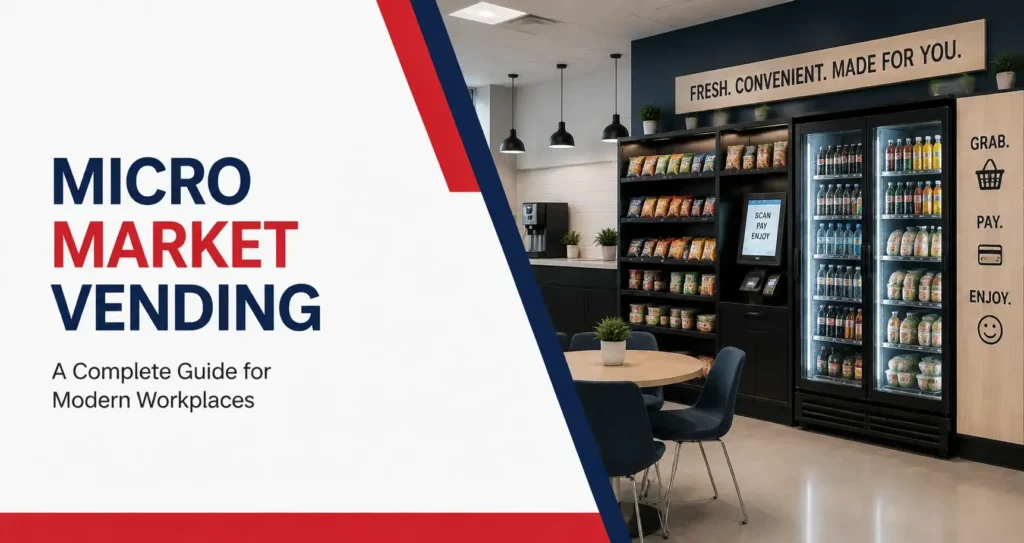
Employees often want more than a packaged snack during the workday. They may need breakfast before an early shift, a quick lunch between meetings, a cold drink after physical work, or something they can take back to their desk. A traditional vending machine can cover many of those needs, but larger teams often want more variety and easier access to fresh food. That is where micro market vending can help.
A workplace micro market turns part of a break room into a small self-service store. Employees can browse open shelves, refrigerated coolers, and display racks before paying at a self-checkout kiosk. The setup can include sandwiches, salads, wraps, snacks, bottled drinks, breakfast foods, and other grab-and-go choices.
For businesses in St. Charles County, a micro market may be a practical fit for offices, warehouses, manufacturing facilities, schools, healthcare workplaces, dealerships, and other locations with steady employee traffic. The right program depends on the number of employees, work schedules, available space, product demand, and security needs.
This guide explains what a micro market is, how it works, which workplaces are a good fit, how it compares with vending machines, and what local businesses should consider before installation.
What Is a Micro Market?
A micro market is an unattended, self-service food and beverage area installed inside a workplace or shared facility. Products are displayed on open shelving, in coolers, and in refrigerated cases. Employees select what they want and pay at a self-checkout kiosk.
Unlike a traditional vending machine, an office micro market allows people to pick up products, read labels, compare choices, and purchase several items in one transaction.
A typical setup may include:
- Open snack shelves
- Refrigerated coolers
- Fresh food displays
- Bottled and canned beverages
- Breakfast products
- A self-checkout kiosk
- Card and mobile payment options
- Product scanning and inventory technology
- Security cameras
- Regular stocking and product rotation
A micro market does not require a cashier or full cafeteria staff. A service provider manages installation, food and beverage selection, restocking, kiosk support, and ongoing adjustments.
How Micro Market Vending Works
A micro market combines food service, unattended retail, and break room technology in one organized space. Employees shop much like they would at a small convenience store, but the market is located inside the workplace.
The process is simple:
- An employee selects food, snacks, or drinks.
- Each item is scanned at the kiosk.
- Payment is made by card, mobile wallet, or another accepted method.
- The transaction is recorded in the market system.
- Inventory and sales information help guide future restocking.
Some systems may also allow employees to create an account or add funds to a market balance. The exact payment options depend on the kiosk and service arrangement.
A managed micro market service generally includes the equipment, product displays, payment technology, regular restocking, product rotation, and customer support.
What Is Included in a Workplace Micro Market?
The final layout depends on the available space, the number of employees, and the types of products the workplace wants to offer. Smaller markets may use a few shelves and one cooler. Larger installations can include several refrigerated cases, display racks, condiment stations, and a larger kiosk area.
Open Shelving
Open shelves hold packaged products that do not require refrigeration. Employees can pick up items, read the packaging, and compare sizes or flavors before making a purchase.
Common shelf products include:
- Chips and pretzels
- Crackers and popcorn
- Candy and chocolate
- Cookies and pastries
- Nuts and trail mix
- Protein bars
- Granola bars
- Breakfast snacks
- Gluten-free products
- Plant-based snacks
Shelving should be organized by product type so employees can find what they need without searching through a cluttered display.
Refrigerated Coolers
Coolers hold cold drinks, dairy products, fresh meals, and other refrigerated items. Depending on workplace demand, the selection may include:
- Bottled water
- Sparkling water
- Soda
- Juice
- Iced tea
- Energy drinks
- Sports drinks
- Yogurt
- Cheese snacks
- Fresh fruit
- Sandwiches
- Wraps
- Salads
- Refrigerated meals
The ability to offer refrigerated products is one of the main reasons workplaces choose a micro market instead of relying only on snack vending machines.
Self-Checkout Kiosk
The kiosk is the market’s main payment point. Employees scan items and complete their purchase without a cashier.
A modern kiosk may accept:
- Credit cards
- Debit cards
- Mobile wallets
- Tap-to-pay
- Employee market accounts
- Prepaid balances
Clear instructions near the kiosk can reduce payment errors and make the first few days easier for employees.
Security and Monitoring
Because products are displayed openly, a workplace micro market usually includes visible security measures. Cameras, transaction records, and account systems can help discourage unpaid product removal.
The market also works best when the workplace has a consistent group of employees, students, residents, or authorized visitors. A highly public area with uncontrolled traffic may require a different setup.
Why Workplaces Choose Micro Markets
A micro market provides more flexibility than a traditional snack area. Employees gain access to a broader selection, while the employer avoids running a staffed cafeteria.
More Food Choices in One Place
Vending machines have fixed rows, coils, and compartments. A micro market uses shelves and coolers, which allows more product sizes, package shapes, and meal options. Employees can buy a drink, sandwich, snack, and dessert in one visit instead of using several machines.
Better Access to Fresh Food
Many employees want something more filling than chips or candy. Fresh food vending through a micro market can include breakfast, lunch, lighter meals, and refrigerated snacks. This can be especially helpful at facilities where nearby restaurants are limited or where employees do not have enough time to leave during a break.
Easier Product Comparison
Open displays allow employees to hold a product, read the ingredient list, review nutrition information, and compare alternatives. Someone looking for a high-protein snack, lower-sugar drink, gluten-free product, or plant-based meal can make a more informed choice.
Convenient Service Across Several Shifts
Micro markets can remain available during early mornings, evenings, weekends, and overnight shifts. Warehouses, manufacturing plants, healthcare workplaces, and distribution facilities often need food options outside standard business hours. A well-stocked market can support teams even when local restaurants are closed.
A More Modern Break Room Experience
An open-market format can make a break room feel more inviting and useful. Employees can browse at their own pace rather than making a quick decision through a vending machine window. A clean layout, organized shelves, and a reliable kiosk can also improve the overall appearance of the room.
What Products Can a Micro Market Offer?
Product selection should match the people using the market. A workplace with mainly daytime office employees may need different choices than a warehouse with physically demanding shifts. A balanced market usually includes familiar products, healthier alternatives, beverages, and more filling food. Choosing the right assortment is an important part of keeping employees engaged with the market. Review our guide to the best micro market products for ideas on snacks, beverages, fresh food, and workplace-specific selections.
Packaged Snacks
Packaged snacks remain an important part of the market because they are quick, familiar, and easy to carry.
Possible categories include:
- Salty snacks
- Sweet snacks
- Protein products
- Nuts and seeds
- Breakfast bars
- Baked goods
- Crackers
- Popcorn
- Fruit snacks
- Better-for-you packaged items
Too many similar products can make the selection feel smaller than it really is. A thoughtful assortment offers different flavors, sizes, and nutritional profiles.
Fresh Meals and Refrigerated Food
Fresh food can turn a snack area into a practical office food service option. Depending on demand and available refrigeration, products may include:
- Sandwiches
- Wraps
- Salads
- Breakfast sandwiches
- Yogurt
- Cheese and protein packs
- Cut fruit
- Prepared meals
- Deli items
- Desserts
Fresh products require careful temperature control, regular rotation, and close monitoring. A provider should review sales and expiration dates so the selection stays useful without creating unnecessary waste.
Cold Beverages
Beverages often account for a large part of workplace refreshment demand.
A market may stock:
- Bottled water
- Sparkling water
- Soda
- Diet and zero-sugar beverages
- Iced coffee
- Juice
- Tea
- Sports drinks
- Energy drinks
- Flavored water
Demand may change with the season. Water and sports drinks may move faster during hot weather, while iced coffee or energy drinks may be more popular during early or overnight shifts.
Health-Conscious Choices
A workplace does not need to remove all traditional snacks to support employee wellness. A better approach is to offer several types of products and let employees decide.
Health-conscious options may include:
- Nuts
- Trail mix
- Protein bars
- Whole-grain snacks
- Lower-sugar drinks
- Bottled water
- Fresh fruit
- Yogurt
- Salads
- Lighter sandwiches
- Plant-based products
Specific labels such as “high protein,” “lower sugar,” or “gluten-free” are more useful than describing every product as healthy.
Micro Markets vs. Vending Machines
Both options give employees access to onsite food and drinks, but they serve different workplace needs.
| Feature | Micro Market | Vending Machines |
| Shopping format | Open shelves and coolers | Enclosed machine |
| Checkout | Self-checkout kiosk | Payment at each machine |
| Product variety | Broad | Moderate |
| Fresh food capacity | Higher | Limited to moderate |
| Space required | More | Less |
| Product handling | Employees can pick up and inspect products | Products remain enclosed |
| Security needs | Higher | Lower |
| Best fit | Larger or high-traffic workplaces | Small to medium locations |
When Vending Machines Make More Sense
Traditional vending may be a better option when:
- Floor space is limited
- Employee traffic is moderate
- The location needs a simple snack and drink setup
- Security is a concern
- The workplace has a smaller team
- Fresh food demand is limited
A business that needs a compact setup can explore office vending machines before committing space to a full market.
When a Micro Market Makes More Sense
A micro market may be a better fit when:
- The workplace has steady daily traffic
- Employees want fresh food
- Several shifts use the break room
- The business has enough open floor space
- Employees need breakfast or lunch options
- Product variety is a priority
- The workplace has controlled access
- A traditional vending setup feels too limited
Some facilities use both. Vending machines may serve one part of the building, while a central micro market provides meals and broader choices.
Which Workplaces Are a Good Fit?
Employee count matters, but it is not the only factor. Hours, shift patterns, location, food demand, and access control all influence whether a market will work well. Smaller workplaces may also benefit from a compact setup when employee attendance, available space, and purchasing habits support the program. Learn more about small office micro markets and how they can fit limited workplace spaces.
Corporate Offices
An office micro market can serve employees who need breakfast, lunch, snacks, and drinks without leaving the building. It may also support hybrid teams during office days, client meetings, training sessions, and long workdays. Offices with limited nearby food options can benefit from having fresh meals onsite.
Warehouses and Distribution Centers
Warehouse employees often work fixed break periods and may not have enough time to drive elsewhere for food. A workplace market can offer cold drinks, filling snacks, sandwiches, meals, and breakfast products across several shifts. Durable shelving and a practical layout are important in high-traffic environments. Businesses operating warehouses and multi-shift facilities can learn more about how warehouse micro markets support employees with different schedules, break patterns, and food access needs.
Manufacturing Facilities
Manufacturing employees may work early mornings, evenings, weekends, or overnight. Food availability must match those schedules. A micro market can provide refreshments when nearby restaurants are closed. Restocking should account for shift changes so later teams do not find empty shelves.
Healthcare Workplaces
Clinics, medical offices, and healthcare facilities often have irregular schedules. Employees may not be able to leave during a busy shift. A self-service market gives staff access to food and drinks without requiring cafeteria hours. Product selection can include coffee drinks, water, breakfast items, lighter meals, and protein-focused snacks.
Schools and Education Facilities
Teacher lounges, administrative buildings, campuses, and staff areas may use micro markets to provide convenient refreshments. The layout and product mix should reflect the people using the space, the school schedule, and any institutional requirements.
Dealerships and Service Centers
Automotive dealerships and service centers often have employees, customers, technicians, and visitors onsite for long periods. A market can serve staff and authorized visitors with snacks, drinks, and meals while reducing the need to leave the property.
How Much Space Does a Micro Market Need?
There is no single market size that fits every workplace.
A compact setup may use:
- One kiosk
- One cooler
- Several shelves
- A small product display
A larger market may include:
- Multiple coolers
- Open shelving
- Refrigerated food cases
- A coffee station
- Condiment storage
- Counter space
- More than one checkout area
The provider should inspect the proposed room before recommending equipment.
Important planning details include:
- Available wall space
- Electrical outlets
- Internet or data requirements
- Door clearance
- Walking paths
- Seating placement
- Refrigerator ventilation
- Delivery and service access
- Security camera placement
- Accessibility
The market should feel like part of the break room, not an obstacle inside it. Proper planning of shelving, refrigeration, checkout placement, and employee movement can make a major difference in how employees use the space. Learn more about micro market design and space requirements when planning a workplace installation.
How the Installation Process Works
A good installation begins with planning. Placing equipment without first understanding traffic and product demand can lead to inefficient use of space.
Workplace Review
The provider gathers information about the business, including:
- Employee count
- Number of shifts
- Break schedules
- Operating hours
- Current food options
- Available space
- Access control
- Product preferences
- Existing vending, coffee, or pantry services
This helps determine whether a market is practical and what size it should be.
Layout Planning
The proposed layout should make shopping and checkout easy. Shelves and coolers need enough space for employees to browse without blocking entrances, seating, microwaves, or trash areas. The kiosk should be visible and simple to reach.
Product Selection
The first product list should reflect employee needs without trying to predict every preference. A balanced opening selection can include familiar snacks, healthier choices, fresh meals, breakfast items, cold drinks, and seasonal products.
Equipment and Kiosk Installation
After the layout is approved, the provider installs the coolers, shelving, displays, kiosk technology, and security equipment. Payment systems are tested before launch, and employees may receive simple instructions explaining how to scan and pay.
Launch and Review
Early sales information helps the provider understand what employees actually buy. Some products may need more shelf space. Others may sell slowly and should be replaced. Fresh food quantities may also need adjustment as demand becomes clearer.
How Micro Market Restocking Works
Restocking should follow actual buying patterns rather than a fixed product list that never changes.
During a service visit, the provider may:
- Refill sold products
- Check cooler temperatures
- Rotate fresh food
- Review expiration dates
- Clean shelves and display areas
- Inspect the kiosk
- Check payment equipment
- Add requested products
- Remove slow sellers
- Review market appearance
Remote inventory and sales data can help the service team prepare before arriving. The route driver can bring products that match current demand instead of guessing.
A busy multi-shift facility may need more frequent visits than a smaller office. The restocking schedule should also change when employee count, hours, or product demand changes.
Fresh Food Safety and Product Rotation
Fresh food requires more attention than shelf-stable snacks. Refrigerated cases need to maintain suitable temperatures, and products should be checked according to their labeled dates. Damaged packaging or expired items should be removed during service.
The workplace should also avoid blocking cooler vents or moving refrigerated equipment without speaking with the provider.
Employees can help by reporting:
- A cooler that feels warm
- Damaged packaging
- A product past its date
- A kiosk issue
- A spill
- An empty high-demand section
A clear service contact makes it easier to address concerns quickly.
Payment Technology and Self-Checkout
The kiosk is one of the most important parts of micro market vending services. Employees should be able to complete a purchase without confusion. The screen needs clear instructions, a working scanner, visible pricing, and reliable payment processing.
Depending on the system, the kiosk may accept:
- Credit cards
- Debit cards
- Mobile wallets
- Tap-to-pay
- Employee accounts
- Prepaid market balances
Account systems may allow employees to add funds and review purchases. Available features vary, so businesses should ask which options are included before installation. The technology behind a micro market also includes security, transaction monitoring, and checkout systems. Learn more about micro market kiosk security and self-checkout systems.
Inventory Tracking and Market Data
Technology can help providers understand how the market performs.
Sales and inventory information may show:
- Best-selling products
- Slow-moving items
- Demand by time or shift
- Products close to selling out
- Transaction volume
- Payment system activity
- Seasonal changes
This information supports better decisions, but employee feedback still matters. Sales data may show what is purchased, while employee comments can explain why certain choices are missing or inconvenient.
Supporting Employee Wellness
A micro market can make healthier options more available, but simply adding a few products does not guarantee that employees will choose them. Placement, variety, freshness, and pricing all affect demand.
A balanced approach may include:
- Water placed in a visible cooler section
- Protein products near familiar snacks
- Fresh meals at eye level
- Several lower-sugar drink options
- Clear product labels
- Different portion sizes
- Vegetarian or plant-based choices
- Familiar treats alongside lighter options
Employees should have meaningful choices rather than a restricted menu.
Combine a Micro Market With Other Break Room Services
A market can work alongside coffee, filtered water, vending, and an employer-sponsored pantry program. Coffee and water are often used throughout the day, while the market handles meals, snacks, and cold drinks. Separating these services can reduce traffic around the checkout area and prevent employees from using cooler space for every daily beverage need.
A managed office coffee and water service can complement the market with brewers, supplies, filtration equipment, and regular restocking.
Some employers also provide selected pantry items at no cost to employees while leaving additional products available for purchase in the market. Employers comparing different refreshment options can review our guide on micro market vs office pantry to understand how employee-paid markets and employer-sponsored programs differ.
How Much Does a Workplace Micro Market Cost?
There is no universal price because each location has different requirements.
Factors may include:
- Employee count
- Expected sales
- Market size
- Number of coolers
- Shelving requirements
- Kiosk technology
- Security equipment
- Product selection
- Fresh food demand
- Installation needs
- Service frequency
- Building access
Businesses should ask for written details about equipment, installation, service responsibilities, payment processing, and any workplace requirements. Avoid assuming that every market installation is structured the same way. Providers may use different service models based on expected usage and location conditions.
How to Choose a Micro Market Provider
A provider will manage more than shelves and food. The quality of service affects product availability, freshness, kiosk reliability, and the overall appearance of the market.
Ask About Local Service
A local service team should understand the area and have a clear process for handling stocking concerns, payment issues, and equipment problems. Businesses looking for micro market services in St. Charles County should ask where the provider’s service team is based and how frequently local routes are serviced.
Review Product Flexibility
A fixed product list can become stale. Ask whether products are adjusted based on employee requests, sales patterns, dietary preferences, and seasonal demand.
Understand Fresh Food Management
Fresh food is one of the market’s strongest features, but it also requires careful management. Ask how products are selected, dated, transported, stored, rotated, and removed when necessary.
Evaluate the Kiosk
The kiosk should be simple enough for employees to use without training. Ask which payments it accepts, how refunds are handled, and what happens when the scanner or payment system fails.
Discuss Restocking Frequency
Service frequency should match demand. A busy warehouse should not receive the same schedule as a small office. Find out how the provider uses sales data and how quickly it responds when popular products sell out.
Consider Future Break Room Needs
A workplace may start with a micro market and later add coffee, filtered water, vending, or pantry service. Choosing a provider with several workplace refreshment options can make expansion easier.
Local Micro Market Services for St. Charles County
Workplaces in St. Charles, St. Peters, O’Fallon, Wentzville, and surrounding St. Charles County communities have different break room needs.
An office may need lunch choices for daytime staff. A warehouse may need food and drinks across three shifts. A manufacturing facility may have concentrated traffic during scheduled breaks. A school or healthcare workplace may need access during irregular hours.
Local planning should account for:
- Employee count
- Shift schedules
- Travel time to nearby restaurants
- Seasonal beverage demand
- Space inside the break room
- Building access
- Fresh food needs
- Current vending or coffee service
- Service response expectations
A workplace micro market in St. Charles County should be designed around the actual facility rather than copied from another location.
Questions to Ask Before Installing a Micro Market
Use these questions when speaking with a provider:
- Is our employee count and daily traffic suitable for a micro market?
- How much floor and wall space will the market need?
- Which fresh foods, snacks, and beverages can be offered?
- How often will fresh food be rotated?
- What payment methods does the kiosk accept?
- How are refunds and payment issues handled?
- Will the market include security cameras?
- How often will products be restocked?
- Can employees request new products?
- How are low-selling products handled?
- Who maintains the coolers and kiosk?
- Can coffee, water, pantry, or vending services be added?
- Which St. Charles County areas does the provider serve?
- What workplace responsibilities are required after installation?
Clear answers help businesses compare providers and avoid misunderstandings.
Micro Market Planning Checklist
Review these points before installation:
- Number of employees
- Number of work shifts
- Break schedules
- Daily visitor traffic
- Controlled building access
- Available floor space
- Electrical outlets
- Internet requirements
- Cooler ventilation
- Security camera placement
- Desired snack categories
- Fresh food demand
- Beverage preferences
- Dietary requests
- Payment options
- Restocking expectations
- Service contact process
- Current break room equipment
- Possibility of future expansion
A site visit can confirm whether the proposed space works for employees and service personnel.
Common Micro Market Mistakes
Installing a Market in a Low-Traffic Location
A market needs steady use. Employee count, shifts, and daily traffic should be reviewed before installation.
Choosing Products Without Employee Input
The first selection should include familiar choices, but employee feedback and sales information should guide later changes.
Ignoring Later Shifts
Employees on second or third shift should have the same opportunity to purchase food and drinks as daytime staff.
Underestimating Fresh Food Rotation
Fresh food can improve the break room, but quantities need to match actual demand.
Placing the Kiosk in a Crowded Area
Employees need enough room to scan, pay, and move away without blocking coolers or shelves.
Failing to Explain Checkout
Simple launch instructions can prevent unscanned items, payment confusion, and unnecessary service calls.
Overlooking Ongoing Support
A market is not a one-time installation. It needs restocking, cleaning, equipment service, product review, and communication.
Create a Better Workplace Food Experience
A well-planned micro market gives employees more control over what and when they eat. Open shelves make products easier to browse, refrigerated cases provide access to fresh food, and self-checkout technology keeps the process convenient.
The strongest program is not necessarily the largest. It is the one that fits the workplace, stays well stocked, supports different shifts, and changes as employee needs develop.
Best Vending provides micro market vending services in St. Charles County for offices, warehouses, manufacturing facilities, healthcare workplaces, schools, dealerships, and other local organizations. The team can help assess the space, recommend equipment, plan the product mix, and support the market after installation.
Contact Best Vending to discuss a workplace micro market designed around your employees, schedules, available space, and food preferences.
Frequently Asked Questions
A workplace micro market is an unattended food and drink area with open shelves, refrigerated coolers, and a self-checkout kiosk. Employees select products and pay without a cashier.
A micro market offers open product displays, more fresh food, and a self-checkout kiosk. Vending machines keep products enclosed and usually require less space.
Products may include packaged snacks, breakfast items, sandwiches, salads, wraps, yogurt, fruit, prepared meals, water, soda, juice, tea, and energy drinks.
Many markets rely on credit cards, debit cards, mobile wallets, employee accounts, or prepaid balances. Available payment options depend on the kiosk system.
Restocking depends on employee count, product demand, market size, fresh food sales, and work schedules. Busy or multi-shift locations may require more frequent service.
Because products are displayed openly, security cameras and transaction monitoring are commonly used. The provider should explain the security setup before installation.
Product requests may be considered along with sales performance, market capacity, supplier availability, and dietary needs.
A small office may not generate enough daily use for a full market. A combination vending machine, pantry program, or smaller refreshment setup may be more practical.
Under a managed service, the provider typically handles stocking, product rotation, kiosk support, and equipment service according to the agreement. Responsibilities should be confirmed before installation.
The first step is a workplace assessment. The provider will review employee count, shifts, break room space, food demand, access, and existing refreshment services before recommending a layout.